Showing posts with label Black Magic. Show all posts

Wednesday, May 1, 2013

Black Magic vs Magic Lantern (Round 1)


Newcomer BlackMagic Design takes on the current feather-weight cinema camera champ Magic Lantern, and there's the bell!  ...Magic Lantern starts off with a wild 2K RAW haymaker but misses with only 1931x1288 making contact!  ...Black Magic capitalizes and tries to make an opening with quick jabs of focus peaking and zebras but Magic Lantern blocks and returns with a scaling sensitivity focus peak and raw histogram punches!  ...Now Magic Lantern in control falls back to a conservative steady attack of 8bit YUV422 (BUT OHH WHAT'S THIS?!) they're slowing down after only 16 seconds!  ...Black Magic bounces right back with a steady barrage of 10bit ProRes422! ...Black Magic with seemingly endless energy shows no sign of letting up on the Champ, this may be it folks!  ...Black Magic winds back for their patented 12bit attack (BUT OOOH!) Magic Lantern hits them with a whooping 14bit uppercut!  Black Magic is down! Black Magic is Down! ...ONE! ...TWO! ...THR... and Black Magic is back on their feet folks, looks like we're going to round 2!!!


The Camera Blogs are a buzz, "Magic Lantern finds RAW Video!", "720p 24fps possible with 1000x CF cards!", "Magic Lantern saves Canon from Black Magic!"  Unfortunately this is all just uneducated speculation polluting the interwebs.  The truth is it's not video, it is Raw but can only produce enough frames for about 2 seconds of video.  This is just bloggers looking for attention, please ignore them and let's take a look at the facts.  
First off the Magic Lantern guys themselves said this is not intended for video, they can only get a few second recordings and are pessimistic about getting much more than that.  
So what is this then?  Magic Lantern seems to have found the source of the sensor scan for video, the "file" is a 2K resolution 14bit RAW image but the actual "usable image" is about 1931 x 1288 pixels, the rest of the 2K file are black bars (and consider those random pixels on the bottom a black bar because it is not part of the recorded image).  Even the "720p mode" is still in the same sized 2K file only with a "usable image" of 1931 x 672 pixels.
'A1ex' (from Magic Lantern) has implemented CHDK's DNG converter to save these RAW images to card. (which likely uses the same CR2 RAW converter already in the camera but instead spits out a DNG rather than a CR2) each frame (or "DNG file") is about 5.09MBs for all the 'standard resolution' sizes and about 9MBs for the '5x and 10x zoomed resolution sizes'.  Remember 1920 x 1080 or 1920 x 720 "useable images" are in the same 2K RAW file, just with more black bars in the 720 file; so they are actually the same file size. 
The "frame buffer" where these images were found only allows up to 7.5MB/s, so it can't write the images to a card fast enough (even with a 1000x card) and when the buffer is all filled up the video recording stops, currently it's getting about 50 frames, which at 24fps is about 2 seconds of video.  However even that is only obtained after turning off all other Magic Lantern features and setting the camera's photo mode to 'JPEG only'; which increases the buffer's write speed.  Having RAW+JPEG or RAW mode on will limit this buffer to 4.9MB/s providing about 30 frames before recording stops (1 second).
The simplest way to get these images through this 7.5MB/s buffer to a card would be to "compress" them further, but I don't believe firmware tweaks have the ability to do that.  So they are trying to crop out the 'usable image' in hopes to reduce the file size a bit but even then it won't be enough so they will still need to either increase the buffer speed and/or use a different compression method already in the camera.
In camera compression choices are:


1. RAW (CR2 or DNG) = 14bit 4:4:4 with a Lossless 1.25:1 frame compression

2. YUV LiveView (HDMI) = 8bit 4:2:2 with uncompressed frames

3. Photo JPEG = 8bit 4:2:2 with a Lossy 2.6:1(Fine) or 15:1(Normal) frame compression

or

4. AVC (H.264) = 8bit 4:2:0 with "variable" Lossy frame compressions (approximately 25:1-12:1)

Here is an example of DNG (RAW) vs JPEG (8bit 4:2:2) *BlackMagic uses "Lossless" and "Standard" DNG

The Magic Lantern team has actually tried option 2 in the past, grabbing a "copy" of the frames going to the LiveView and saving them to the removable media card,  this attempt was back in late 2012 which resulted in what they were calling 'silent pics' which saved a 1056 x 704, 8bit, 4:2:2, "YUV" JPEG file for each frame for 24fps.  Their recent attempts with their "LiveView YUV recorder" have evolved into a 1904 x 720 24fps 8bit 4:2:2 Uncompressed "sequence" (a group of frames in one file) that can record up to 400 frames (16 seconds).  This should provide us with similar quality to Canon's clean HDMI out except this is straight to the internal card in 16 second bursts without the need of an external recorder.  Their is currently no sound recorded in the "sequence" but they are also working on a way of recording a separate sound file that matches the first few seconds for audio syncing purposes in post. 
Some have asked if HDMI out is the answer but sending the 14bit RAW images.  HDMI won't work because Canon's HDMI out can't display that much detail; it's limited to 8bit, requires 'de-Bayering'(not RAW data), limits at 4:2:2 'sub-sampling', and needs to crop and resize that 2K image down to 1920 x 1080 before it can send it through the HDMI port.  Once you do all that "compressing" guess what we're left with?  Yep the 8bit 4:2:2 uncompressed (not RAW) image that Canon gave us with the 1.2.1 firmware update. 

So this is not Raw video.  But Magic Lantern have not given up on trying to turning this 2 seconds into a 14bit DNG video solution, they are currently looking for other "paths" to send the DNGs through and they've just discovered that writing bigger chucks at a time increases the write speeds for the removable media cards.  So if they can apply this to the 14bit DNGs we might be able to get 24fps recordings in more usable runtimes rather than their current 2 second limits, but even the magic lantern team is skeptical on that so all we can do is wait patiently and stop reading those over exaggerated misguided blogs.

Saturday, April 13, 2013

How to wait for a BlackMagic Camera, Part 1


  Like the night before Christmas, I find myself too excited to sleep after deciding to go through with my pre-order of the Black Magic Pocket Cinema Camera.  I keep scouring the internet looking for any information I can as if they were hints to a present under the tree and keep a tab of my email box open eyeing it like I used to eye the chimney in hopes of catching an early glimpse of Santa Claus.

  I've found in these situations it's best to stay productive, so I decided to 'bake the cookies and pour the milk' by figuring out exactly how this new camera will impact my existing workflow.
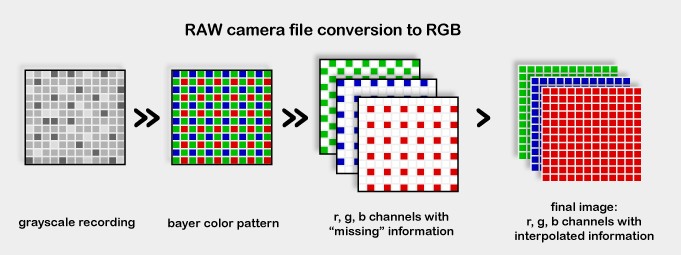
Process showing how an imaging sensor captures color
   All the footage I currently work with has already gone through a de-bayer process (or de-mosaic) in camera, this actually creates a file 3x bigger than the RAW image data so the colors are usually 'sub-sampled' down to a lower level of information in order to reduce the file's size which helps storage capacity and bandwidth requirements.  Although this processes results in only vaguely lower visual quality it unfortunately throws away pixel data and replaces them with 'interpolation'(pixel clones), causing a 'baked-in' look straight out the camera that makes the image very fragile to edit which causes graphic glitches when pushed too far.
The recipe for required bandwidth and storage capacity is relatively simple for a RAW image compared to 'baking' an interpolated image.   

Take one full cup of resolution, which in the case of the BMPocketCC is 1920x1080, and multiply the horizontal pixels by the vertical pixels. So in this case 1920 x 1080 = 2,073,600 total pixels per frame.  
 Mix in the recording color depth, the BMPocketCC has a choice of 10 bit or 12 bit, then multiply the total pixels by the color depth. 2,073,600 x 12 = 24,883,200 total bits per frame. 
 Next add a dash of recording frame-rate, the BMPocketCC has options ranging for 23.976 to 29.97 ATSC standard frames per second, now multiply the total bits by the recording frame-rate. 24,883,200 x 23.976 = 596,599,603.2 bits per second.  
Then divide them up into equal portions for 8 bit servings, storage media such as memory cards and hard drives can only take 8 bit 'bites'(aka 1 Byte) at a time,  do this by dividing  a Byte into the bits per second.  596,599,603.2 / 8 = 74,574,950.4 Bytes per second.
Bake the ingredients together at the specified compression ratio , BMPocketCC plans to use a 1.2:1 or 1.5:1 1.3 compression ratio,  divide the total Bytes per second by the compression ratio.  74,574,950.4 / 1.3 = 57,365,346.5 Bytes per second (rounded up to 57 MegaBytes per second).
 There you have it, and to figure out how many cards your footage will feed divide the MegaBytes per second into a card's storage capacity, for example a 64GB SD card would be 59.604** / 0.057 = 1039 seconds (rounded down to 17 minutes and 18 seconds) of RAW footage per 64GB card.  Yikes! this is going to require a lot of expensive cards!  Many people complained about the 12 minute recording limit on DSLRs which have thankfully been fixed in the newest models but with the BMPocketCC recording RAW video we'll be right back there.  Hopefully the Secure Digital Card industry will catchup to this technology quickly and start to offer larger capacity high-speed cards and lower prices. 
**1,000,000,000 bytes is actually 1,073,741,824 bytes (1024 Bytes in a KB, 1024 KB in a MB, 1024 MB in a GB) so 64,000,000,000 / 1,073,741,824 = 59.604 GBs
  The first hurdle to incorporate a BMPocketCC would seem to be storage capacity.  Card storage is very important in the field and not having enough can make or break a camera's reliability as a primary shot capturing 'A-Cam' or secondary shot saving 'B-Cam', the 'main cameras' on a typical shoot.  I'm used to 50Mbps footage while the BMPocketCC's RAW recordings will yield about 600Mbps footage; that will require roughly 12x more space to store the same 'runtime'.  Currently I'm getting by on projects with a handful of $20 16 GigaByte memory cards for my 'main cameras', I usually fill up one per camera before I can get the time to sit down with my laptop to dump the footage and I always keep a second on hand so that I can continue recording while the files transfer. The 50Mbps recording cameras provide at least a 42 minute and 30 second runtime per card,  the BMPocketCC's RAW video can only record up to 15 minutes of runtime to one $120 64 GigaByte card, which is today's highest  capacity SD card fast enough to write the RAW footage.  I will need at least three 64GB SD cards to match the record times that I require to run the BMPocketCC's Raw recording as a reliable main camera.
   An equal concern is archival storage capacity; my current project archival system is 1.5 TeraBytes and is setup for projects with up to 100 GigaBytes a piece, since they utilize 50Mbps that is roughly 266 minutes of runtime. However if I were to replace my main cameras (A-Cam & B-Cam) with BMPocketCCs that would require 1.2 TeraBytes to store one project, almost my entire archive!  To add another 1,200 GigaBytes per project into my system is one tough cookie to swallow and not the most practical solution for me; a better solution for me would be to attempt only replacing my 'B-Cam' with a BMPocketCC, which usually equates to about 40 percent of my project, that way the added file sizes would only impact about 110 minutes of my project's footage requiring an extra 416 GigaBytes and 500 GigaBytes per project is sightly more palatable.
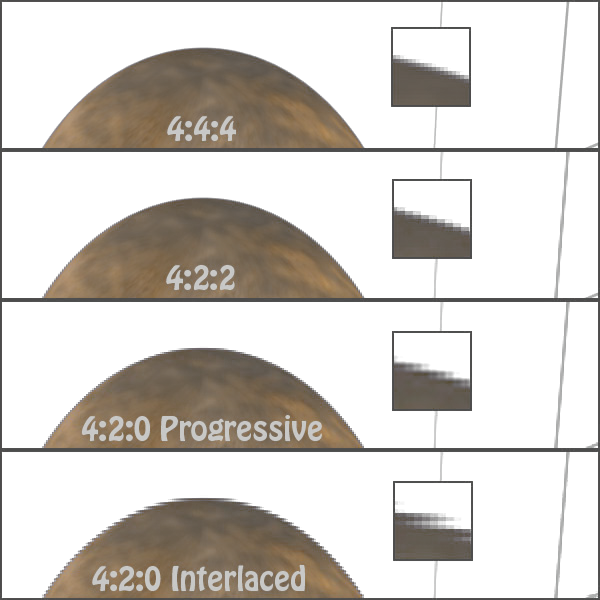
Thankfully Black Magic Design had the foresight to include not only a RAW recording option but also a 'lossy compression codec' with medium levels of interpolation that tries to preserve as much information as possible and manages to reduce file sizes down to 220Mbps for situations when a manageable size is more important than higher image quality.  Using Apple's 'ProRes HQ' codec the BMPocketCC will preform a '4:2:2 color subsampling', which throws away every other horizontal pixel then clones what's left over to the neighboring column, and opens 10 bits of bandwidth for color capturing, making color reproduction 4x less accurate than 12 bit RAW.  This iteration of 'ProRes HQ' preforms a perfectly centered balancing act between 12 bit RAW and the AVC codec found in all current DSLRs and many Professional Camcorders, giving half the image quality of RAW but twice the quality of AVC codec footage found in DSLRs.
Examples of color accuracy
Examples of subsampling


To help prepare ourselves for what to expect with the BMPocketCC, I've compiled a list of SD Card options and their approximate footage capacities.


For CinemaDNG (1.2:1~63MB/s):
SanDisk "Extreme Pro 95MB/s" 64GB 90MB/s write ($119.99) holds almost 16 mins
SanDisk "Extreme Pro 95MB/s" 32GB 90MB/s write ($60.13) holds almost 8 mins
Toshiba "Exceria Type 1" 32GB 90MB/s write ($60.99) holds almost 8 mins
Panasonic "Gold Pro" 32GB 80MB/s write (EU only) holds almost 8 mins
Toshiba "Exceria Type 1" 16GB 90MB/s write ($34.99) holds almost 4 mins
SanDisk "Extreme Pro 95MB/s" 16GB 90MB/s write ($37.95) holds almost 4 mins
SanDisk "Extreme Pro 95MB/s Micro" 16GB 80MB/s write ($49.43) holds almost 4 mins
Panasonic "Gold Pro" 16GB 80MB/s write (EU only) holds almost 4 mins
Toshiba "Exceria Type 1" 8GB 90MB/s write ($ ) holds almost 2 mins
SanDisk "Extreme Pro 95MB/s" 8GB 90MB/s write ($20.95) holds  almost 2 mins
SanDisk "Extreme Pro 95MB/s Micro" 8GB 80MB/s write ($25.15) holds  almost 2 mins
Panasonic "Gold Pro" 8GB 80MB/s write (EU only) holds  almost 2 mins
----------------------------------------------------------------------------------------
For ProRes HQ (220Mbps~27.5MB/s):
Lexar "Professional 600x" 256GB 40MB/s write ($594.80) holds 155 mins
SanDisk "Extreme Pro 45MB/s" 128GB 45MB/s write ($139.94) holds 77 mins
PNY "Professional X 233x" 128GB 35MB/s write ($144.99) holds 77 mins 
Transcend "Ultimate UHS-1(red card)" 64GB 40MB/s write ($54.95) holds 38 mins*Most Practical solution
PNY "Professional X 233x" 64GB 35MB/s write ($69.99) holds 38 mins (Write Speed Tested with Blackmagic Speed Test App at 61MB/s but choppy for Blackmagic Pocket's ProRes422 HQ (27.5MB/s) recordings)
SanDisk "Extreme Pro 45MB/s" 64GB 45MB/s write ($72.95) holds 38 mins (Write Speed Tested with Blackmagic Speed Test App at 43MB/s and is not choppy for Blackmagic Pocket's ProRes422 HQ (27.5MB/s) recordings)
Sony "UHS-1 94MB/s" 64GB 45MB/s write ($73.67) holds 38 mins
SanDisk "Extreme Pro 95MB/s" 64GB 90MB/s write ($119.99) holds 38 mins
ADATA "Premier Pro" 32GB 44MB/s write ($35.99) holds 19 mins
Sony "UHS-1 94Mb/s" 32GB 45MB/s write ($39.02) holds 19 mins
SanDisk "Extreme 45MB/s" 32GB 45MB/s write ($39.95) holds 19 mins
Transcend "Ultimate UHS-1(red card)" 32GB 40MB/s write ($39.99) holds 19 mins
SanDisk "Extreme Pro 95MB/s" 32GB 90MB/s write ($60.13) holds 19 mins
Toshiba "Exceria Type 1" 32GB 90MB/s write ($60.99) holds 19 mins
Panasonic "Gold Pro" 32GB 80MB/s write (EU only) holds 19 mins
SanDisk "Extreme Pro 45MB/s" 32GB 45MB/s write ($73.95) holds 19 mins
PNY  "Pro-Elite Plus 80MB/s" 32GB 35MB/s write ($139.99) holds 19 mins
Lexar "Professional 600x" 32GB 40MB/s write ($ ) holds 19 mins
SanDisk "Extreme 45MB/s" 16GB 45MB/s write ($22.95) holds 9 mins 30 seconds
Toshiba "Exceria Type 1" 16GB 90MB/s write ($34.99) holds 9 mins 30 seconds
SanDisk "Extreme Pro 95MB/s" 16GB 90MB/s write ($37.95) holds 9 mins 30 seconds
SanDisk "Extreme Pro 95MB/s Micro" 16GB 80MB/s write ($49.43) holds 9 mins 30 seconds
PNY  "Pro-Elite Plus 80MB/s" 16GB 35MB/s write ($65.99) holds 9 mins 30 seconds
Transcend "Ultimate UHS-1(red card)" 16GB 40MB/s write ($ ) holds 9 mins 30 seconds
Panasonic "Gold Pro" 16GB 80MB/s write (EU only) holds 9 mins 30 seconds
SanDisk "Extreme Pro 95MB/s" 8GB 90MB/s write ($20.95) holds 4 min 45 seconds
SanDisk "Extreme Pro 95MB/s Micro" 8GB 80MB/s write ($25.15) holds 4 min 45 seconds
PNY  "Pro-Elite Plus 80MB/s" 8GB 35MB/s write ($34.99) holds 4 min 45 seconds
Transcend "Ultimate UHS-1(red card)" 8GB 40MB/s write ($ ) holds 4 mins 45 seconds
Toshiba "Exceria Type 1" 8GB 90MB/s write ($ ) holds 4 min 45 seconds
Panasonic "Gold Pro" 8GB 80MB/s write (EU only) holds 4 min 45 seconds
Transcend "Ultimate UHS-1(red card)" 4GB 40MB/s write ($ ) holds 2 mins 22 seconds
--------------------------------------------------------------------------------------------------
These Cards are too slow:
SanDisk "Extreme 30MB/s UHS-1" 
SanDisk "Ultra 30MB/s UHS-1"
Transcend "Premium UHS-1 (dark blue card)"
Class 10 SD Cards and below

If anyone knows anymore suitable cards please post them, I'll be updating this list over time.  

Thursday, April 11, 2013

All your Canon are become to obsolete

   Back in grade school I used to enjoy playing handball with all the kids at recess.  At first I had no idea what I was doing, fumbling around trying to hit that ball, eventually I some kind friends and older kids decided to show me the ropes and taught like the 'chop', an 'ace' and the 'lob'.  After a while I got the hang of it and started getting good,  but there was also that one kid with the move I could never defend against, the dirtiest of tricks, the 'Black Magic'.
  So I have an idea of how Canon must feel at this year's NABshow (National Association of Broadcasters) when their newest competitor, Black Magic Design, showed up with this:
http://www.blackmagicdesign.com/products/blackmagicpocketcinemacamera
   The Black Magic Pocket Cinema Camera is a Full HD (1920x1080) resolution video camera that records its footage without any added processing, generally called RAW recording.  This is a very important feature for a video camera to have if image quality is important to you.
   The DSLR Revolution bought with it 'close to' Cinema camera image quality for a tenth of the price, creating an explosion of Indie Filmmakers and Videographers, wonderful as they are were not without their short comings.
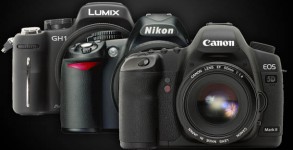
Common Video DSLRs
Canon ultimately pulled ahead of the competition, due in no small part to the help of their 'kind friends' in the Magic Lantern community which provided their DSLRs with very useful video centric features aimed at the professional and enthusiast users.  Five years after the release of the first video enabled DSLRs and many updates later the manufacturer's finally began providing the features their users were looking for; but by doing so hit a proverbial wall of advancement, any further would start to contend with their Professional Camcorder and Cinema Camera offerings so it seemed the remaining issues left unattended were here to stay. 
magiclantern on Canon EOS 7D
   Like myself learning grade school handball, the manufactures made plenty of mistakes in their early models; Nikon fumbled their D90 with a limiting resolution option and poor encoding codec, Canon improved on that with the 5D mark II but forgot manual exposure settings and limited their frame-rate options, Panasonic with their GH1 was arguably the best hardware and software for the job but had very limited bit-rates for their encoding bandwidth while Sony and others slowly crept into the market.  
  Just as the DSLR manufacturers started to get the hang of this market with real winners like the Canon 5D mark III and Panasonic GH3 a relatively new company to the camera manufacturing game shows up with a real 'game changer'.  This new camera from Black Magic Design not only addresses the issues plaguing all DSLR but it also provides an image quality that directly competes with the Professional Camcorder and Cinema Cameras, revealing just how fragile the line between the two are. 
The Black Magic Pocket Cinema Camera with a $26,000 Cinema zoom lens.
Many have rightfully said how the Canon 5D mark II (along with Magic Lantern) has broken down the walls of entry to the professional video industry but this camera has just blown up any remanence of that wall to dust!  But that's enough hype, let's get down to specifics and see what this camera is all about.
The most important part of any camera is the imaging sensor, thanks to some friends on the EOSHD Forum, they've narrowed down the likely sensor as either the CIS1910F or the CIS1021 both from Fairchild imaging which they described as sCMOS sensors "...ultra low-noise CMOS image sensor intended for scientific and industrial applications requiring high quality imaging under extremely low light levels." this estimation was based on the fact that Black Magic Design's other model, the 'Black Magic Cinema Camera', currently uses an sCMOS sensor from Fairchild imaging which Black Magic Design's Public Relations has claimed offers the exact same image quality as the new BMPocketCC.
Fairchild imaging's CIS1021 sCMOS
BMPocketCC diagram mockup


Which ever sensor ends up in the BMPocketCC promises 13 stops of Dynamic Range in 12 bit image files, minimal rolling shutter and a 1600 ISO image clean of signal noise.  Compared to Canon's 5D mark III with its 10 stops of dynamic range the BMPocketCC offers 6x more detail in the highlights and shadows of the image.  The 12 bits color space means 4,096 shades of each color which is 8x more accurate color reproductions than any current DSLR with their 8 bit codecs and even more accurate than some Professional Camcorders.  Rolling shutter effects appear better than any DSLR I've seen but that is a subjective matter and the ISO noise is on par with today's current offerings from most newer models. 
Even having the best sensor in the world, which BAE Systems considers to be the CIS1021, means nothing if coupled with a poor quality image codec.  Encoding codecs are very important in a modern day video camera, it compresses the image data so that it can be easily stored on a removable media device such as a memory card or on computers with smaller hard drives.  I mentioned before that the BMPocketCC provides RAW video footage, in a CinemaDNG lossless compression wrapper, but that may not be the best choice for every situation so the camera also provides a 10bit 4:2:2 ProRes HQ lossy compression Intra-frame codec which 'throws away' some image data while only causing a minimal amount of visual degradation unlike DSLR's 8bit 4:2:0 AVC lossy compression Inter-frame codec which throws away twice the color information as well as reducing the color accuracy by a factor of 4 when compared to Apple's ProRes HQ.  The AVC was designed as a 'delivery codec' meant to help stream a video over the internet or squeeze onto an optical disc while ProRes is an 'acquisition codec' which reduces size while attempting to preserve the information needed for editing and manipulating an image.
Apple iPhone 4 smart phone
Sony's NEX 3 mirrorless camera
Its looks remind me of an Apple iPhone 4 while its form factor is clearly inspired by Sony's NEX line of mirrorless cameras.  It uses the very affordable and common Nikon EN-EL20 battery, the lens mount accepts Micro Four Thirds lenses and employs an 'active' electronic communication for those lenses to control their apertures with either a push button auto exposure or through manual incremental steps.  Their are no automatic modes for shutter speeds, image gain, white balance or focus which may turn some people away but it was intended for those that require manual settings to ensure the camera stays locked in to their delicately chosen settings.  The camera does however offer focus peaking which outlines object that are in focus to help manual focusing accuracy and 'zebras', an exposure assist feature to check for blown out highlight details, it also does not take photos but supports a time-lapse function.
The idea of having a pocket sized RAW video recorder is too good to pass up, especially considering its price at just $995, so I suggest pre-ordering this because it's very unlikely you'll be finding BlackMagic Design in any retail store and judging by its popularity since the announcement, if you don't order early you might not be seeing them at all since BlackMagic Design doesn't have the best record at filling their back-orders quickly.  Understand though, technically it will 'work' with as little as a $13 SD card and a $100 lens, but that just makes this a suitable toy rather then a tool, which is perfectly fine if this is for a hobby or you're using it to learn on; if you need this to make you money prepare to spend a bit more than $995.  To incorporate it into my work I'm not only going to need more accessories to run it as a reliable A or B cam but also more drive space and beefier computer parts to handle the bigger files and higher quality images, so I'm likely looking at another $1,100 - $2,000; potentially the same cost range as adding a 5D mark III or D600 or GH3 or NEX VG30 if not more... but with the BMPocketCC it forces me to get ready for a 'RAW/Low Compression' workflow which I think was BlackMagic Design's point and not really a bad idea for me to do. 

-http://www.blackmagicdesign.com/products/blackmagicpocketcinemacamera/techspecs
-http://www.bhphotovideo.com/c/product/964117-REG/blackmagic_design_blackmagic_pocket_cinema_camera.html